98%
of words on a page you need to know before reading feels comfortable without a dictionary
Vocabulary research (Paul Nation, 2006)
Choose MeloLingua if you want packaged story arcs with audio and output. Keep Readlang if open-web reading and browser glosses are how you mainly read.
Readlang is useful when you want glosses on whatever you find online. MeloLingua narrows the surface into graded story sessions where text, audio, vocabulary, and speaking practice stay synchronized.
Written by our language team· Updated · How we write comparisons
Source and disclosure: MeloLingua publishes this comparison and appears in it. Product facts are checked against official sources; recommendations are editorial judgments about how each app fits a learning routine, not controlled evidence that one app produces better outcomes.
By the numbers
Reading and listening inside a story — with help when you need it — helps many people remember words better than flashcards alone.
98%
of words on a page you need to know before reading feels comfortable without a dictionary
Vocabulary research (Paul Nation, 2006)
95%
known-word coverage is a practical minimum for supported reading, but still leaves frequent unknown words
Vocabulary research (Paul Nation, 2006)
A1–B2
the current level range used for MeloLingua story sessions and public graded readers
MeloLingua product fact · verified August 13, 2026
Side by side
This table compares how you actually practice — not brand hype. We say where Readlang still wins; see the verdict cards below.
MeloLingua vs Readlang — side-by-side comparison
| Topic | MeloLingua | Readlang |
|---|---|---|
| Primary surface | Mobile story sessions with checkpoints | Browser reader for online text |
| Content control | Graded catalog and level-aware sessions | Whatever you browse |
| Listening | Narration for story practice | Depends on page or external audio availability |
| Speaking | Guided pronunciation after story lines | Mostly self-managed |
| Best fit | Learners who want packaged arcs | Power readers who love the open web |
Open web to guided arc
A browser reader gives freedom. MeloLingua adds constraints that make progress easier to repeat.
1
The story is chosen to be finishable, not accidentally overwhelming.
2
Vocabulary help stays in the same experience.
3
The audio belongs to the exact lines you just read.
4
A checkpoint turns reading into output before the session ends.
Original angle
Learners need exploration, but they also need a daily unit that can be completed without deciding what to read next.
Focus
Knowing where practice starts and ends reduces procrastination.
Level
Graded stories protect attention from texts that are too easy or too punishing.
Transfer
The learner leaves the session having said selected lines aloud.
What Readlang is
Readlang is a web reader (browser extension and site) that lets you click words for translations while reading online pages. You choose any article or site you want — but difficulty and audio are not packaged with it.
Real situations
These are realistic learner situations — not every switch means canceling your current app.
Open-web reading is infinite; habits need edges. MeloLingua sessions start and end on a graded story — read, listen, speak — so you can repeat the same block tomorrow without choosing new material.
Spanish reading practice →Recognition without audio and output stays passive. MeloLingua adds matched narration and speaking checkpoints on the same lines you read — closing the loop Readlang intentionally leaves open.
Try tap-to-translate demo →Keep Readlang for authentic sites you care about. Use MeloLingua on weekdays for graded reading at your level. It is easier to know most words on the page when difficulty is intentional, not accidental.
Spanish texts to read →Research note: Click-to-translate keeps you reading hard pages without giving up. The missing piece is often listening and speaking on the same text. Graded story sessions add matched audio and repeat-aloud practice; open-web reading adds authenticity — many learners use both.
Who should pick what
Readlang: Browser glossing is strongest when the open web is your curriculum.
MeloLingua: Graded stories reduce the “is this too hard?” decision before each session.
MeloLingua: The session ships with narration and repeatable pronunciation practice.
Related guides
If Readlang is close but not quite right, these guides cover the next apps people usually try.
Try MeloLingua
Open a graded passage, hear the story narration, and move from reading to speaking on real A1–B2 content. These are current product screens, not concept artwork.
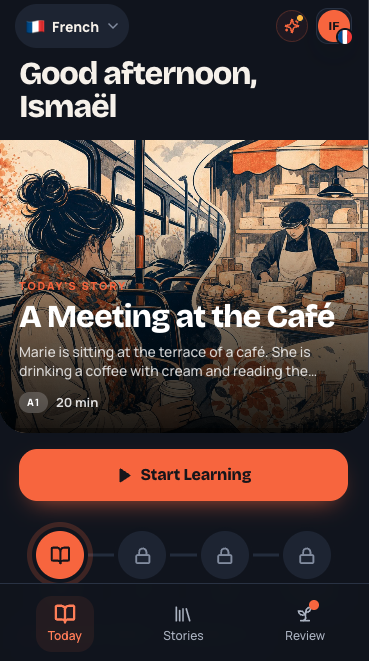
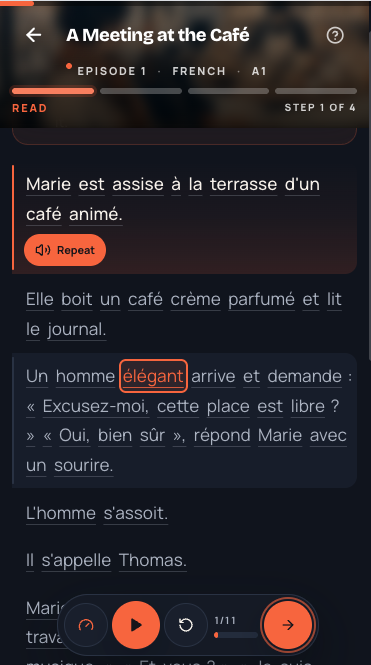
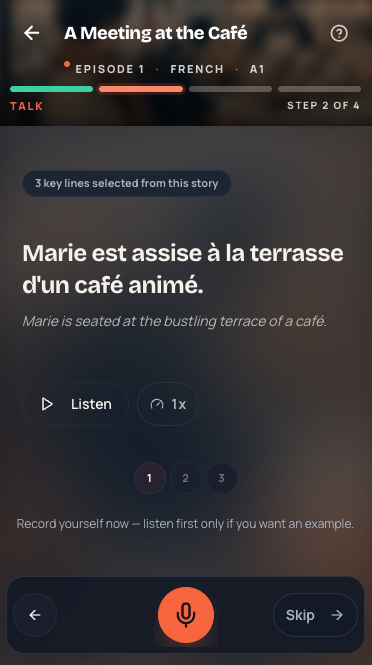
Graded A1–B2 passages — no tab hunting required.
Built-in glosses on curated content, not arbitrary web pages.
Structured difficulty when open-web reading is too random.
Finite sessions with audio and speaking checkpoints.
Learn the method
Our comparisons draw on published research about reading in context, learning words through stories, and building a daily habit — with sources linked below.
Answers
MeloLingua is best when you want finished story sessions with audio and speaking drills. Keep Readlang for open-web articles that you choose yourself.
Readlang adds translation help while browsing. MeloLingua delivers graded story arcs with vocabulary support, narration, and pronunciation practice in one flow.
MeloLingua offers fast vocabulary support inside story sessions so learners can resolve meaning without leaving the narrative.
MeloLingua helps speaking because it prompts learners to repeat narrated story sentences after comprehension checks.
Yes. Use Readlang for web exploration and MeloLingua for daily story sessions with audio and output.
MeloLingua is built for learners who want daily exposure to compound into comprehension, vocabulary recall, and clearer spoken sentences.
Review these words right before you would forget them